Karpathy's LLM Wiki Is Brilliant. The Access Problem Almost Killed It.
I built a LLM wiki that learns from every AI conversation I have. Getting other tools to read it was the hard part, and it’s still not fully solved.
Every useful conversation I’ve had with Claude is now searchable, indexed, and cross-linked. The wiki capturing them runs automatically. No copy-paste, no tagging, no manual filing.
Getting there took two weeks. Getting other tools to read it took one more.
What Karpathy Described, and What I Actually Built
Andrej Karpathy dropped a gist in early 2026 describing an LLM wiki: a folder of markdown files that an AI incrementally builds from your sources. Not RAG. The LLM compiles the knowledge once, structures it, and you query the structure. The index fits in a single context window. It’s embarrassingly simple.
I built it with one addition: capture is automatic. No manual step, no copy-paste.
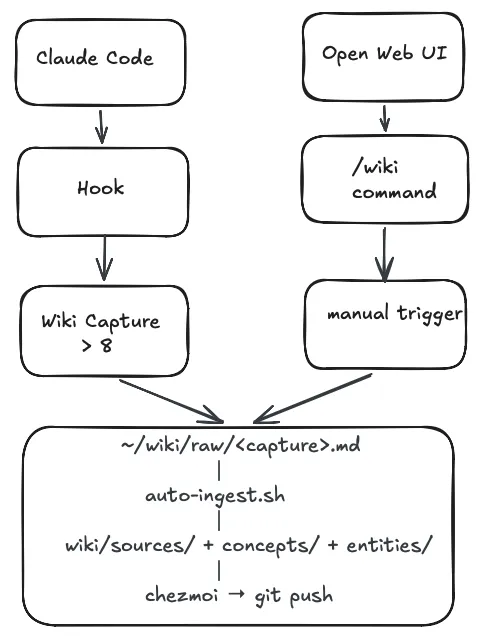
Every Claude Code session with 8 or more user turns gets evaluated when I close it. A stop hook reads the session JSONL, counts the turns, and fires a non-interactive Claude process:
"$CLAUDE" --dangerously-skip-permissions \
  -p "Use the wiki-capture skill. Here is the conversation transcript:
---
$TRANSCRIPT
---
Wiki raw directory: $WIKI_RAW"
There’s no code deciding what’s worth keeping. A markdown file lists five criteria: new setup, reasoned decision, reusable process, key facts, reusable checklist. Claude reads the transcript, applies them, and either writes a structured capture to ~/wiki/raw/ or exits silently.
A launchd watcher fires on that write, runs auto-ingest.sh, and Claude processes the raw file into wiki/sources/, wiki/concepts/, or wiki/entities/. chezmoi commits it to git.
One closed session. Zero manual steps.
For Open Web UI conversations, the entry point is manual. You type /wiki at the end of a conversation worth keeping, and the same downstream pipeline picks it up and processes it identically. The automation is on the ingest side, not the trigger side.
That’s the capture side. Now the access side, where I’ll be honest about what works and what doesn’t yet.
Three Walls
Once the wiki was building up, three problems showed up fast.
Concurrency. The wiki is flat markdown files. Two parallel agent sessions can both update the index simultaneously. Last write wins, no transaction. Addy Osmani’s solution is git worktrees per agent, each owning dedicated files. rohitg00 documents file-level TTL locks for a 6-agent production system. Both work, but neither is native to the wiki architecture. For solo use, the risk is low. For a team, it’s a real problem without a clean solution.
Trust and approval. Simon Willison put it well: “Verification, not generation, is now the bottleneck.” For a personal wiki this isn’t a problem. If I wrote it, it’s true for me. But a review layer would kill the thing it’s protecting. The wiki works because no human is in the loop. Add approval gates and you’ve traded automation for a process, and process means ownership, and ownership on shared knowledge means politics. The problem moves from technical to organisational faster than any tooling can keep up with.
Access. This is the one I’ve made the most progress on.
The Access Problem, and What MCP Does About It
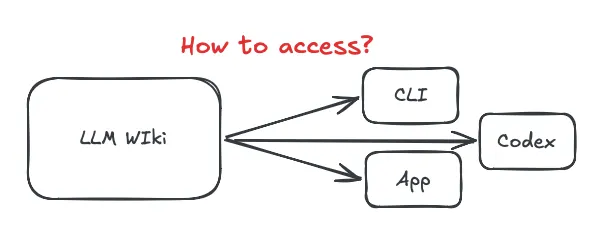
The wiki lives at ~/wiki/. By default, only tools running on my Mac with filesystem permissions can read it. Claude.ai on the web can’t. My phone can’t.
The fix is to stop treating the wiki as a folder and start treating it as a server.
MCP (the Model Context Protocol) lets you expose any data source as a structured interface that any compatible client can query. I run mcpo locally, which wraps MCP servers in an OpenAPI HTTP layer. My config:
{
  "mcpServers": {
    "filesystem": {
      "command": "npx",
      "args": [
        "-y",
        "@modelcontextprotocol/server-filesystem",
        "~/wiki"
      ]
    },
    "wiki-search": {
      "command": "qmd",
      "args": ["mcp"]
    }
  }
}
With this running, any tool that speaks MCP, including Claude Desktop, Open Web UI, Cursor, and Cline, can query the wiki directly. Claude Desktop connects natively. Open Web UI connects via the mcpo bridge at host.docker.internal:8001. Both get read and write access to the wiki directory.
One thing mcpo required that cost me an afternoon: no wildcard paths. Every allowed directory must be listed explicitly. ~/wiki is in; everything else isn’t. That’s your access control, crude but sufficient for personal use.
What works now: Claude Desktop and Open Web UI can query, read, and contribute to the wiki. Any conversation in either tool can pull wiki context or trigger a capture write-back.
What doesn’t work yet: Claude.ai on the web, mobile, any machine that isn’t mine. MCP is still local-first. Remote MCP servers exist, you can run one on a VPS or Cloudflare Worker, but the auth story is immature. That’s the gap between “accessible where I have filesystem” and “accessible from anywhere.”
Why MCP Is the Right Model Even Before It Fully Works
The instinct when you hit the access problem is to export. Dump the wiki to Notion. Sync it to Obsidian. Build a static site with search.
Those work, but they break the loop. The wiki’s value isn’t just reading. Tools can also contribute to it. When Open Web UI evaluates a conversation and writes a capture, it does so via the same MCP filesystem server. The writer and reader use the same interface.
Obsidian’s MCP plugin gives read access. The GitHub MCP server lets any client read wiki pages via the repo. These work now for the read-only problem, at the cost of write-back.
The full picture, any platform reading and contributing with proper auth, needs a purpose-built MCP server. That’s a longer post.
The Setup, If You Want It
Three components:
1. wiki-capture skill: evaluates sessions, writes raw captures. Lives in ~/.claude/skills/wiki-capture/SKILL.md. Registered in ~/.claude/settings.json as a Stop hook.
2. auto-ingest.sh + launchd watcher: fires on any new file in ~/wiki/raw/, runs Claude non-interactively from ~/wiki/ so CLAUDE.md is discovered, commits via chezmoi.
3. mcpo + filesystem MCP server: exposes ~/wiki/ over HTTP to any MCP client. Config above.
The one trick: chezmoi re-add silently skips new files. It only updates already-tracked ones. Use chezmoi add --recursive ~/wiki/wiki/ every time a new page is created, or your wiki will fill up locally and never reach git.
What’s Next
The access problem is solvable. A purpose-built MCP server for the wiki, with read/write separation, proper path controls, and enough structure to serve remote clients, is the next step. That post will cover when to build an MCP vs. use an existing one, what the auth story looks like, and what I built wrong the first time.
If you’ve hit the same walls differently, I’d want to hear about it.